Getting your records
Registry Forge, Patient Edition starts from files you already have the legal right to obtain. There are two routes to them, and they do not produce the same thing. Downloading from a patient portal gives you a structured export this pipeline reads directly. Requesting records from a hospital records office gives you a fuller copy of the chart, usually as PDFs, which this pipeline does not read. Both are useful. Read the next section before you decide which one to ask for.
The portal export and the records release are different files
| Patient portal export | Records office release | |
|---|---|---|
| Usual format | C-CDA XML, plus a human-readable summary | PDF, paper, or CD; sometimes an XML or EHI export on request |
| What is in it | Coded problem list, medications, labs, vitals, allergies, immunizations, visit summaries | The designated record set: clinical notes, scanned outside records, imaging reports, signed forms, department-held documents |
| Completeness | The portion the portal exposes, which is a subset of the chart | Fuller, including material that never appears in the portal |
| How long it takes | Available in the portal, built in the background for large record sets | Up to 30 calendar days under the HIPAA right of access, with one permitted extension |
| This pipeline | Parses it directly | Not parsed by this pipeline |
The parser walks a folder or zip and reads files ending in .xml, then keeps the ones whose root element is a ClinicalDocument. Everything else in the folder is ignored rather than rejected, described in Stage 1, folder discovery. That has a practical consequence: a participant can send you their entire download, PDFs included, and the pipeline will quietly use the part it understands.
If what you get is PDFs
A PDF release is still useful, and still something to request and to share. It often holds the material a portal export leaves out: the outside hospital's discharge summary, the scanned genetics report, the neurologist's full note, the EEG report, records from before the health system went electronic. For a rare disease cohort that content is frequently the reason the record was requested in the first place.
What it means for this pipeline is narrower: the steps on this page stop at the point where a structured document exists. Getting data out of a PDF is a separate piece of work, whether that is manual abstraction by a coordinator, OCR on scanned pages, or an extraction step of your own design. If you do abstract from PDFs, the output schema describes the long-format shape the rest of the tooling expects, so abstracted records can be assembled into the same CSV and run through the dashboard, OMOP, Mondo, and Phenopackets exports alongside parsed documents.
So: request both when you can, share both when your protocol allows it, and know which one this pipeline is consuming.
Asking the records office for a structured file
Before assuming a records request means paper, ask for the electronic version. Health systems running a certified EHR generally have some structured export available even when the request form only offers paper, CD, or portal delivery. Ask, in this order, for a C-CDA or CCD in XML, then for the EHR's electronic health information (EHI) export, then for anything machine-readable. If the answer is no, ask for the reason in writing and take the PDFs.
Downloading the structured export from Epic MyChart
The screenshots below were captured from MyCHOP, the Epic MyChart portal at Children's Hospital of Philadelphia, on 5 September 2026. Patient names have been blacked out. Other Epic sites use the same screens with their own colors and logo, and Epic changes its layout over time, so look for the labels rather than the exact pixels.
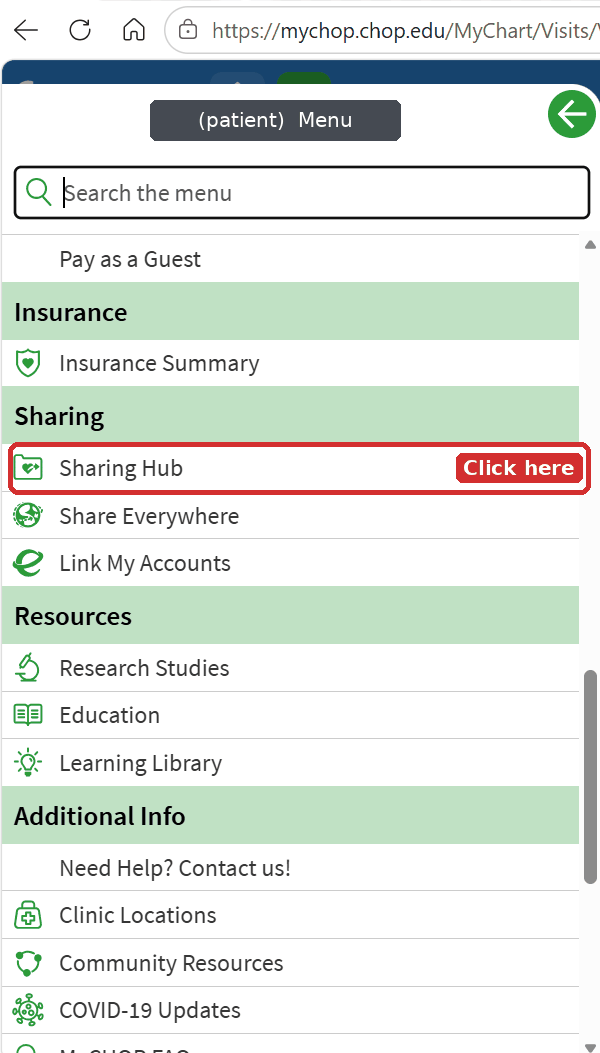
Step 1: open the menu and choose Sharing Hub
Log in, open the main menu (the icon at the top of the page), and scroll to the Sharing group. Choose Sharing Hub. Some organizations also expose this as "Share My Record".
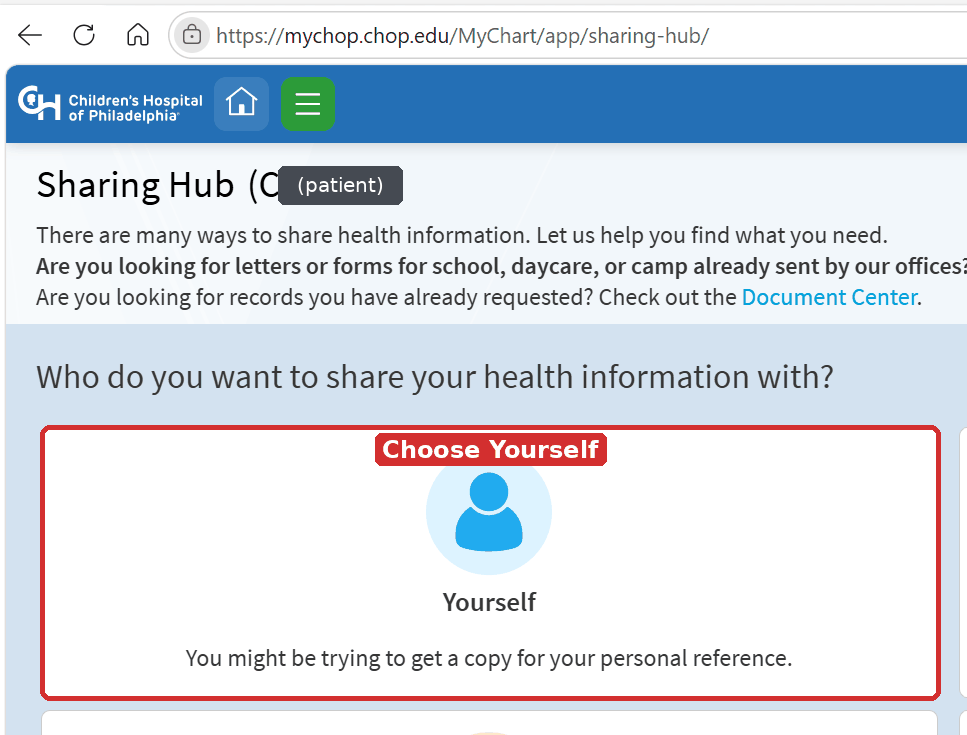
Step 2: share with yourself
The Sharing Hub asks who is receiving the information. Choose Yourself. The other choices route to a provider or an app and will not give you a file on your own computer.
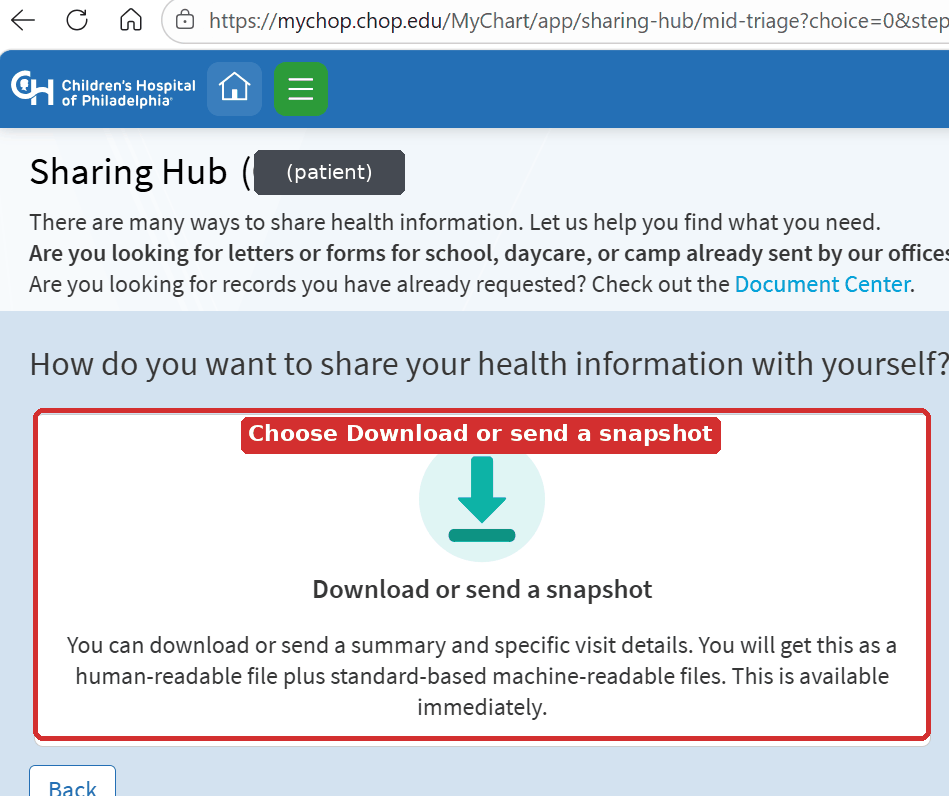
Step 3: choose the snapshot download
Next the portal asks how you want to share with yourself. Choose Download or send a snapshot. As the page itself says, this produces a human-readable file plus standards-based machine-readable files, which is exactly what the parser needs.
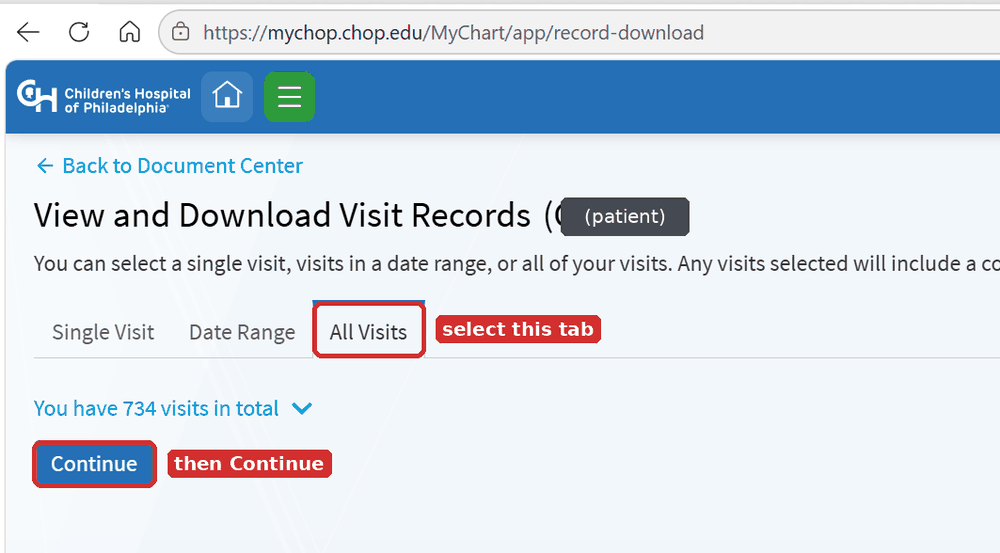
Step 4: select All Visits
The visit records page offers a single visit, a date range, or everything. For research use, choose the All Visits tab and then Continue. A single visit or a date range works the same way if you only need part of the record.
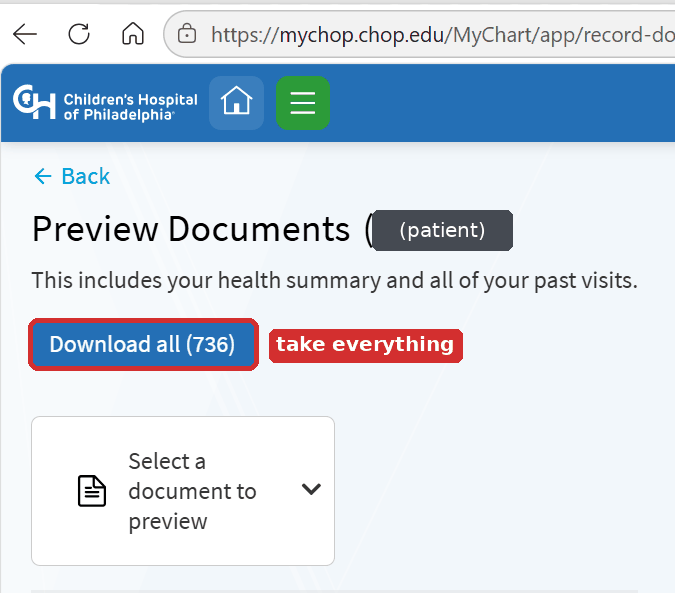
Step 5: download all the documents
The preview page lists every document the request will include and shows the total on the button. Choose Download all rather than previewing documents one at a time.
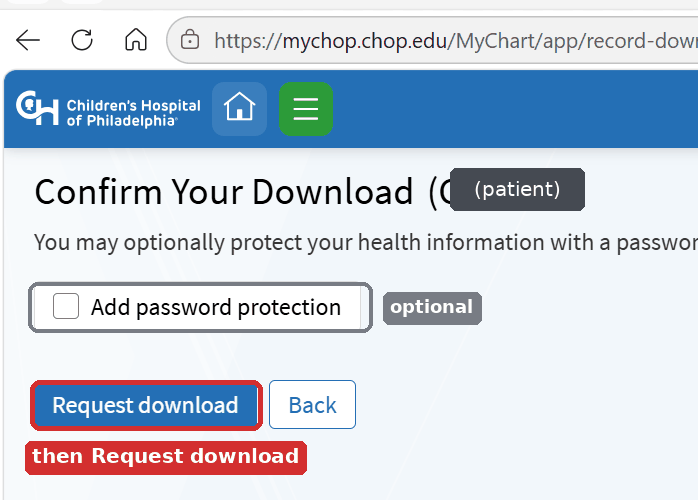
Step 6: confirm, and think about the password
Epic offers optional password protection on the file. If you add a password you will need it every time you open the archive, and anyone you later share the file with will need it too. Choose Request download when you are ready.
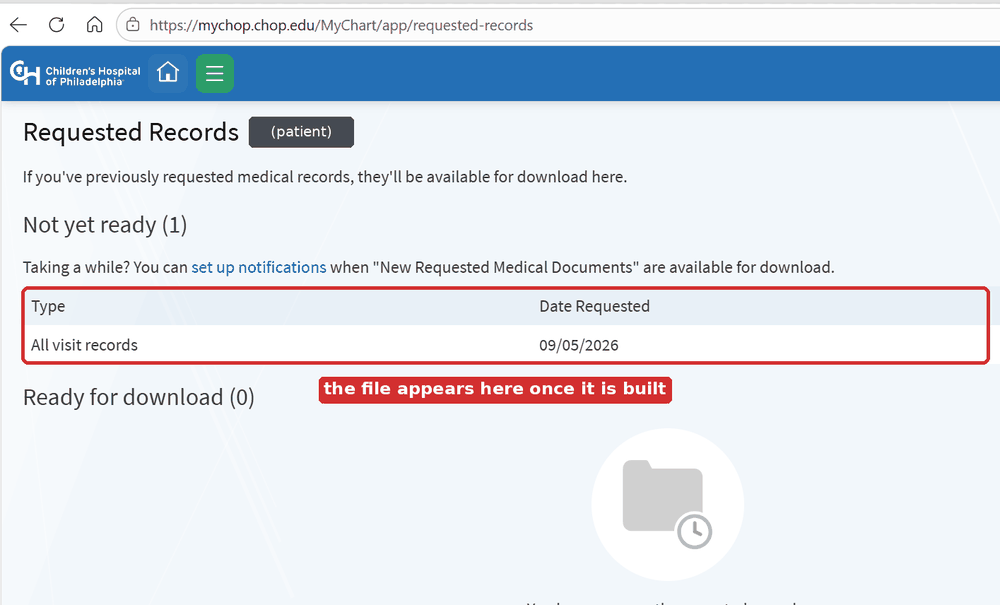
Step 7: collect the file when it is built
Large record sets are assembled in the background. The request appears under Not yet ready in Requested Records and moves to Ready for download when the file exists. Epic can email you when it is ready if you set up notifications from the link on that page.
After the download
- Save the archive somewhere you control, not a shared or synced folder, unless you have decided that is acceptable.
- Unzip it. Inside you will typically find XML documents alongside a stylesheet and one or more human-readable summaries.
- Point the tool at the unzipped folder, or at the zip itself:
If you are sending records to a study team, send the zip rather than the loose files. The Quickstart picks up from here, and Privacy & PHI describes what is in the file before you send it anywhere.
If your portal is not Epic
Other portals behave differently
These instructions describe Epic MyChart. Oracle Health (Cerner) HealtheLife, MEDITECH, athenahealth, eClinicalWorks healow, and other portals put the same function in different places and give it different names. The download you get from them may also differ in content and structure.
Look for wording along these lines in your portal's menus: download my record, health record export, transmit, Blue Button, Continuity of Care Document, CCD, or C-CDA. If a portal offers a choice of format, ask for XML or C-CDA rather than PDF, because a PDF cannot be parsed into structured records by this tool.
The parser has been tested against Epic MyChart C-CDA 2.1 exports and handles the Epic-specific patterns described in Stage 2, C-CDA parsing. Documents from other systems are often valid C-CDA and parse without trouble, but some portals ship narrative-only documents with no structured entries, in which case the parser will find few or no records. Limitations lists the vendors that have and have not been tested. If you have a non-Epic export that does not parse, an issue on the repository with a de-identified sample is the most useful thing you can send.
Requesting records from a records office
Every health system has an office that releases copies of the chart, usually called health information management (HIM), medical records, or release of information (ROI). The process is broadly the same everywhere, and the details below are the ones that differ from hospital to hospital.
Two different requests
Records to you. Under the HIPAA right of access at 45 CFR 164.524, you can ask for a copy of your own record, or your minor child's record as their personal representative. Some points from the HHS guidance that are useful to know before you write:
- The covered entity must act on the request within 30 calendar days, with at most one 30-day extension, and it must tell you in writing within the first 30 days if it is taking the extension.
- If the record is held electronically and you ask for an electronic copy, you must be given it in the form and format you asked for when that is readily producible.
- Fees are limited to the cost of copying labor, supplies such as a USB drive, postage if you asked for mail, and preparation of a summary if you agreed to one. Search and retrieval cannot be billed to you for your own record.
- Access cannot be withheld because a bill is unpaid.
Records to someone else. Sending your record to a study team, a second-opinion clinic, or a school is a disclosure to a third party, and that requires a signed HIPAA authorization naming who receives it and what is released. This is the form most hospitals hand you, and many hospitals will use it for both purposes. If you are the parent or guardian of a minor, you normally sign it, though state law and hospital policy carve out categories such as adolescent mental health where the patient signs as well.
What to write on the form
The delivery format field is the one most often left blank, and blank usually means paper. Say what you want:
- Format: electronic, C-CDA or CCD XML if available, otherwise the EHI export, otherwise PDF
- Delivery: portal, secure email, or USB drive
- Scope: which dates, which departments or campuses, and whether you want scanned outside records included
- Contents: notes, labs, imaging reports, medication history, problem list, immunizations
A sentence you can adapt: I am requesting an electronic copy of the complete designated record set for [patient name, date of birth], from [start date] to present, in C-CDA or CCD XML format if readily producible, otherwise as PDF, delivered by [portal / secure email / USB drive]. This request is made under my right of access at 45 CFR 164.524.
Questions to settle with your own hospital
The answers differ by health system, so find them on the hospital's records page or by calling the office:
- Which form does the hospital use, and is a separate attestation required for anything?
- Which office holds which records? Inpatient stays, outpatient clinic visits, specialty and primary care sites, and imaging are frequently split across different destinations, and sending the form to the wrong one adds weeks.
- Are mental health, substance use, or HIV-related records routed separately, and do they need a separate initial or signature?
- At what age does the patient sign for themselves, and at what age do they sign alongside a parent for particular categories?
- Which formats can the office produce, and what does each cost?
- Can the request be submitted inside the patient portal instead of by fax or mail?
One hospital's process: Children's Hospital of Philadelphia
Drawn from the CHOP page Obtaining Medical Records, which was marked as reviewed 5 January 2026 when this guide was written. Confirm the current addresses and fees on that page before sending anything.
- Get the form. Authorization to Release/Obtain Patient Information (PDF). A Spanish version is also posted. The form is signed by the patient's parent or legal guardian, or by the patient if they are 18 or older; a signature from anyone else needs guardianship documentation attached.
- Fill in the delivery format. The CHOP form notes that paper is the default when nothing is selected, so write in the electronic format you want.
- Initial the sensitive categories if they apply. Substance use, HIV, and mental health information are released only when you initial next to each of them.
- Send it to the right office.
| Records you need | Where the form goes |
|---|---|
| Inpatient stays at Philadelphia or King of Prussia or Children's Seashore House, ED visits and stays of 23 hours or longer, Urgent Care, Same Day Surgery, Seashore House therapies | Health Information Management, CHOP Buerger Ambulatory Care Center, 3500 Civic Center Blvd, Room P-1180, Philadelphia PA 19104. HIMROI@chop.edu, phone 215-590-3640, fax 267-426-8654 |
| Outpatient doctor visits and blood tests at Philadelphia or King of Prussia | The department that provided the service; call 215-590-1000 to reach it |
| Specialty Care Center or Primary Care Center visits | The center where the service was provided |
| X-rays, CT, MRI, ultrasound (released on CD) | Radiology File Room, 3401 Civic Center Blvd, Philadelphia PA 19104. RRA@email.chop.edu, fax 215-590-4783 |
| Inpatient or outpatient mental health records | CEDROI@chop.edu, fax 267-426-8654, phone 267-426-1323. Section 3 must be initialed, and a patient aged 14 or older signs and initials |
- Expect a fee schedule for paper. CHOP posts per-page rates that step down as the record gets longer, plus a separate search and retrieval charge that it states cannot be applied when you are requesting your own personal health record.
- Check the portal route as well. CHOP notes that a records request can also be submitted inside MyCHOP through the questionnaire section, and that portal information is free. CHOP also states that the portal gives access to portions of the electronic medical record and is not an all-inclusive record, which is the reason to make the records request at all.
Use the CHOP example as a template for what to ask your own records office, not as a description of what your hospital does.
Sites used for this page
- Children's Hospital of Philadelphia, Obtaining Medical Records
- Children's Hospital of Philadelphia, Authorization to Release/Obtain Patient Information (PDF)
- U.S. Department of Health and Human Services, Individuals' Right under HIPAA to Access their Health Information
- eCFR, 45 CFR 164.524, Access of individuals to protected health information
Next steps
- Quickstart, running the parser on what you downloaded
- Output schema, the shape abstracted records need to match
- Privacy & PHI, what is inside the file and how to handle it
- Stage 2, C-CDA parsing, which sections the parser reads